Showing posts with label HACKING. Show all posts

Is your WiFi being used illegally? Track the culprits

If you thought that its impossible to detect the physical location of a person in your Wireless Lan (WiFi), then read on. A tool called Moocher Hunter can help you physically track the users connected in your WiFi network. This tool would come handy for network admins or police authorities who would want to spot and catch hackers using WiFi for illegal purposes . Recently the Indian police raided the Mumbai home of an American expatriate after someone used his open wireless network to send an email that took responsibility for a bomb blast that killed at least 42 people.Actually someone used wardriving to use his internet connection to send that sensitive e-mail.

Good things about MoocherHunter-

  • Its free to use.
  • It can predict the Physical Location of the computer using the WiFi connection.


The algorithms applied use various signal variables to accurately predict the position of the connected laptop/machine. MoocherHunter™ identifies the location of an 802.11-based wireless moocher or hacker by the traffic they send across the network. If they want to mooch from you or use your wireless network for illegal purposes (e.g. warez downloading or illegal filesharing), then they have no choice but to reveal themselves by sending traffic across in order to accomplish their objectives. MoocherHunter™ enables the owner of the wireless network to detect traffic from this unauthorized wireless client (using either MoocherHunter™’s Passive or Active mode) and enables the owner, armed with a laptop and directional antenna, to isolate and track down the source.


LINK TO THIS POST :


Edit any website with a single line of code

Have you ever thought of editing the web pages of another website..!! This simple code makes it possible.

Image and video hosting by TinyPic
But,you can’t actually edit the actual web page but you can edit the page as you see it on your screen.

This is one of the ways scammers create fake screenshots, fake Adsense & affiliate earnings and even fake Paypal transactions.

All you need to do is visit the site you want to edit, paste the code below into your web browser address bar (tested in Firefox & IE7) and hit the Enter button.Then simply select a portion of text on the page and start editing.

CODE :

javascript:document.body.contentEditable='true'; document.designMode='on'; void 0


LINK TO THIS POST :


Change the background Picture of the Gtalk Window.

It will be crazy if we can set our own picture as background for the gtalk chat window.This can be done with a small application ' my theme ' which i had found while surfing.

+ Download the application from

+Install the application and navigate through start -> all programs -> dash -> my theme -> click change background.

+ Choose your favorite picture from the window.

+ Exit and reopen the gtalk.Go to settings -> appearance -> from drop down menu, select my theme and click ok.
DONE .. !! Open a chat window and you can see the background picture for it.

You can insert amazing emoticons in the gtalk (see in pic) . The shortcuts for these emoticons can be seen here :
start -> all programs -> dash -> my theme -> click Help

LINK TO THIS POST :


StartBtn Renamer

http://www.geocities.com/startbtn/StartAnim.gifStartBtn Renamer is a simple utility for renaming the [Start] button under Windows XP. With this freeware tool, you can change default Label of the [Start] button with your own text. This is great when you want to tease your friends or when you intend to have a greater variety in Windows... what do you think about these labels: Virus, Hello, Begin, Enter, etc.


LINK TO THIS POST :


How to hide files in JPEG pictures

Using a simple trick in Windows, you can actually hide a file inside of the JPG picture file!

You can hide any type of file inside of an image file, including txt, exe, mp3, avi, or whatever else. Not only that, you can actually store many files inside of single JPG file, not just one!

Hide File in Picture

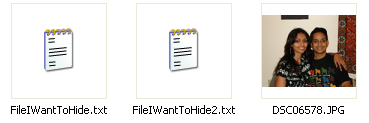
  • Create a folder on your hard drive, i.e. C:\Test and put in all of the files that you want to hide into that folder. Also, place the image that you will be using to hide the files in.

hide file in jpg

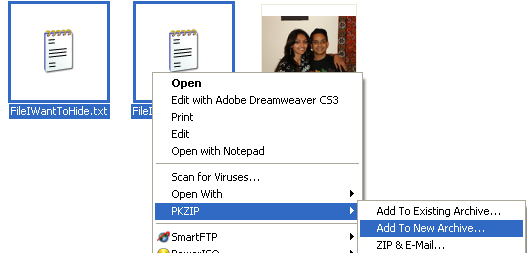
  • Now select all of the files that you want to hide, right-click on them, and choose the option to add them to a compressed ZIP or RAR file. Only select the files you want to hide, not the picture. Name it whatever you want, i,e. “Hidden.rar”.

add to archive

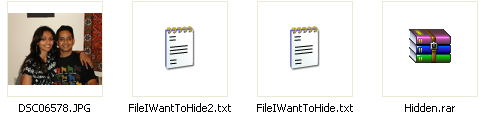
  • Now you should have a folder that looks something like this with files, a JPG image, and a compressed archive:

hidden rar

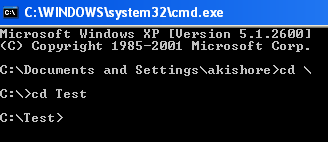
  • Now here’s the fun part! Click on Start, and then click on Run. Type in “CMD” without the quotes and press Enter. You should now see the command prompt window open. Type in “CD \” to get to the root directory. Then type CD and the directory name that you created, i.e. “CD Test“.

cd test

  • Now type in the following line: “copy /b DSC06578.JPG + Hidden.rar DSC06578.jpg” and press Enter. Do not use the quotes. You should get a response like below:

hide files in jpg

Just make sure that you check the file extension on the compressed file, whether it is .ZIP or .RAR as you have to type out the entire file name with extension in the command. I have heard that some people say that they have had problems doing this with a .ZIP extension, so if that doesn’t work, make sure to compress to a .RAR file.

And that’s it! The picture file will have been updated with the compressed archive inside! You can actually check the file size of the picture and see that it has increased by the same amount as the size of the archive.

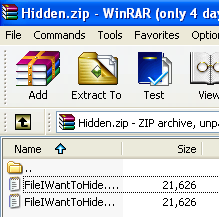
You can access your hidden file in two ways. Firstly, simply change the extension to .RAR and open the file using WinRAR. Secondly, you can just right-click on the JPG image and choose Open With and then scroll down to WinRAR. Either way, you’ll see your hidden files show up that you can then extract out.

winrar

That’s it! That is all it takes to hide files inside JPG picture files! It’s a great way simply because not many people know it’s possible and no one even thinks about a picture as having to the ability to “hide” files. Enjoy!


LINK TO THIS POST :


How to Create a CON folder in Windows?


TYPE-1

how to create "CON" folder in windows system

1>create a folder
2> rename with CON
3>press alt+255
4> when you rename with con at that time press alt+255+enter
5>enjoy my friend

TYPE-2

Open the Command prompt by Start -> Run and typing cmd

Code:
C:\> md \\.\c:\con
Now, Open My Computer and browse through the path where you created CON folder... Surprising.. ?? Yeah.. you have created it successfully

Now, try to delete the folder from My computer

OOPS!!! You cant delete it...

Now, try this in command prompt console

Code:
C:\> rd \\.\c:\con
Yeah!! You did it...


Not only CON, we cannot create any of these
CON, PRN, AUX, CLOCK$, NUL, COM1, COM2, COM3, COM4, COM5, COM6, COM7, COM8, COM9, LPT1, LPT2, LPT3, LPT4, LPT5, LPT6, LPT7, LPT8, LPT9 and more

The reason is that con, prn, lpt1..lpt9, etc are underlying devices from the time dos was written. so if u r allowed to create such folders, there will be an ambiguity in where to write data when the data is supposed to go to the specified devices. In other words, if i want to print something, internally what windows does is -- it will write the data to the folder prn (virtually u can call it a folder, i mean prn, con, etc are virtual folders in device level). So if we are able to create con folder, windows will get confused where to write the data, to virtual con folder or real one.


LINK TO THIS POST :


HACKING TUTORIALS


Collection with 1000+1 solutions in order to you make Hacking in anything thought..
code PHP:


Create Bootable XP SP integrated CD,Create One-click Shutdown And Reboot Shortcuts.txt Creating a Board aka Forum on your own PC !.rtf
Creating Universal Ghost Usb Boot Disk And Cd.txt
Data Capacity of CDs [Tutorial].txt ,Debug, Learn how crack windows.txt,Delete An undeletable File.txt,Delete Files From The Recent File List In Windows.txt,Digital Camera Guide.txt
Digital Faq -learn Everything About Digital, Capture, Edit and Burning and more.txt 2.20 kB
Digital Photo Id Cards, Greate Info.txt 2.88 kB
Direct Link To Any Page You Want To In Hotmail.txt 1.95 kB
Directx Explained.txt 7.66 kB
Disable Compression On Xp, NTFS partition, Disk Cleanup.txt 0.43 kB
Disable The Send Error Report, to Microsoft.txt 0.51 kB
Disable Windows Logo Key.txt 0.62 kB
Discover New Music You'll Probably Love.txt 1.08 kB
Download Free Music legally,, legally.txt 3.24 kB
Download from a paypal site without paying a penny!.txt 0.95 kB
Download From Ftpz, Using Ftp Search Sitez.txt 8.12 kB
Download Mp3's Without Using Filesharing.txt 0.69 kB
Download Music And Video With ,edia Player9, quick and easy!.txt 0.66 kB
Download Timeframes.txt 0.33 kB
Dual Boot After The Fact.txt 1.37 kB
Dvd Copying-ripping Definitions.txt 1.25 kB
DVD Regions Information.txt 3.84 kB
Dvd-9 to Dvd+r Dl, Double Layer To Double Layer, 1-1 copies.txt 0.94 kB
Easily Disconnect-reconnect From Broadband.txt 0.30 kB
Easily Find Serial Numbers On Google.., easy to do and works like a charm..txt 1.40 kB
Ebay Hackcracktip.txt 0.50 kB
General Keyboard Shortcuts.txt 7.54 kB
Get In Windows 2000 As Administrator.txt 0.39 kB
Get the Most Out of Your DVD Recorder.txt 11.25 kB
Get The Music You Want To Hear.txt 0.90 kB
Get unlimited bandwidth from your host for free.txt 2.88 kB
Getting A 1gb Yahoo China Account.txt 0.98 kB
Getting Counter-strike Source To Work.txt 3.36 kB
Getting movies, mp3,games using google.txt 0.75 kB
Getting older programs to run on Windows XP.txt 2.96 kB
Getting started with Linux for nOObs!.txt 17.37 kB
Go to Windows updates anonymously.txt 0.40 kB
Google Crack Search.txt 0.14 kB
Google secrets.txt 0.98 kB
Google Tips & Tricks, (utilizing search engine).txt 5.81 kB
Graffiti On Walls 4 Adobe Photoshop Cs 8.0.txt 2.45 kB
Guide For Getting Free Stuff.txt 10.33 kB
Guide to IIS Exploitation.txt 27.77 kB
Guide to Slipstreaming Service Pack 2.txt 2.82 kB
Hard drive Gone Bad.txt 5.55 kB
Hardware Firewall.txt 3.02 kB
How To Add An Option To Print, the Contents of a Folder!.txt 1.47 kB
How To Add Your Own Windows Tips.txt 0.48 kB
How to Back Up the Registry.txt 0.76 kB
How To Backup Ps2 Games.txt 7.71 kB
HOW TO BLOCK PEOPLE ON WINMX WHO SHARE NOTHING.txt 1.51 kB
How To Block Websties Without Software, block websites.txt 0.64 kB
How To Boot Xp Faster (updated).txt 1.66 kB
How to build a black box.txt 7.79 kB
how to burn quicker in windows xp.txt 0.28 kB
How to Bypass BIOS Passwords.txt 9.05 kB
How To Bypass Web Filters, tutorial.txt 6.20 kB
HOW TO CAPTURE STREAMING MEDIA.txt 1.68 kB
How To Change A Cmos Battery.txt 3.18 kB
How to change the serial number used in Windows XP, Valid for XP Corporate.txt 1.11 kB
How To Change Thumbnail Size And Quality.txt 0.90 kB
How to clear Bios info 2.txt 23.55 kB
How to clear Bios info.txt 11.75 kB
How To Convert File System, fat - fat32 to ntfs.txt 0.52 kB
How To Copy A Dvd Which Will Play On A X Box.txt 1.01 kB
How to copy songs from your iPod to your PC.txt 1.40 kB
How To Customise Your start Button.txt 1.54 kB
How To Delete Those Persistent Nasty Files.txt 0.53 kB
How To Directly Go To Inbox, Write Msg, w Hotmail, no need for How to find MP3's real quickly.txt 0.35 kB
How To Find Serial Numbers On Google.txt 0.79 kB
How to fix corrupted files in XP.txt 1.48 kB
How to fix Windows Installer problem.txt 0.96 kB
How To Get A Free I-pod Or Flat Screen Tv, check it out.txt 6.62 kB
HOW TO GET ANY WINDOWS PASSWORD.txt 3.41 kB
How to Get someones ISP password, Get free internet.txt 2.65 kB
How To Get Top Ranking, Search Engines.txt 6.58 kB
How To Hack Windows Xp Admin Passwords.txt 2.52 kB
How to hack-change your Windows XP Boot Screen.txt 1.52 kB
how To Hide Yourself From Network Users!, And give access to only specific users!.txt 0.86 kB
How To Make An Animted Logo.txt 5.26 kB
How To Make Free Phone Calls.txt 2.29 kB
How to make key generators.txt 8.83 kB
How To Make Perfect Copies Of Maxis The Sims Discs, CloneCD Style!.txt 1.17 kB
How To Make XP Go Faster.txt 5.58 kB
How To make your own Radio Station 2.txt 3.26 kB
How To Make Your Own Radio Station.txt 1.58 kB
How to Remove DRM Protection for Video Files.txt 2.29 kB
How To Remove Ms Java Vm And Install Sun Java.txt 0.05 kB
How To Remove Signin Details Of Msn Passport.txt 1.04 kB
How To Remove The Default Admin$ Shares.txt 1.03 kB
How to remove the Links folder in IE Favorites.txt 0.59 kB
How to Remove WinXP Splash and See Operations.txt 1.19 kB
How To Rename Extensions With Ease, with a Renamer.bat file!.txt 0.44 kB
How to Rename File Extensions.txt 3.11 kB
How To Rename Multiple Files In Winxp.txt 0.56 kB
How To Restrict Login Hours Allowed.txt 0.58 kB
How to safeguard your files when computer crashes.txt 2.94 kB
How to save Windows xp updates.txt 0.63 kB
how to search google for RAPIDSHARE links.txt 0.98 kB
How To See Hidden Files, Using Dos.txt 0.08 kB
How To Set search For All Files In Winxp.txt 0.71 kB
How to set up a http server running from you computer.txt 3.06 kB
How To Set Up A Proxy In Flashget, As Requested.txt 0.66 kB
How to set up a server with Apache , PHP , MySQL , Perl , phpMyAdmin.txt 8.77 kB
How To Set Up Direct Connect.txt 26.96 kB
HOW TO SET UP FTP SERVER.txt 1.79 kB
How To Set Up Proxies In Your Browser.txt 1.63 kB
How To Set Zone Alarm Settings!, Fix for ZA ports.txt 2.12 kB
How To Setup Your Own Dns (Domain Name Server).txt 6.97 kB
How To Speed Up A Slow Computer.txt 1.21 kB
How To Speed Up Http Requests On Internet Explorer, as above.txt 1.28 kB
How To Stop Spam.txt 8.05 kB
How to swear in all languages.txt 28.32 kB
How To Unload Cached Dll Files To Free Memory.txt 0.56 kB
How to Use and How to Chain Multiple Proxies!.txt 9.70 kB
How To Use File Compression In Windows Xp.txt 4.19 kB
How To Use Google To Download Mp3's, and applications.....txt 0.60 kB
How To Use Newsgroups.txt 0.56 kB
How To Use You Gmail With Msn Messenger.txt 0.37 kB
How-to Get Videos And Dvds Onto Your Sony PlayStation Portable (PSP) for free.txt 12.91 kB
HOWTO Change Windows XP Home to Windows XP Pro.txt 1.67 kB
Important Faqs For Sp2.txt 9.47 kB
Improve Doom 3's Performances!!, simple but efficient trick for every1.txt 4.22 kB
Improve your dialup modem preformance.txt 0.73 kB
Increase XP Folder Settings.txt 0.79 kB
Insert Your Serial For Office 2k, auto install office.txt 1.06 kB
Install A New Hard-disk.txt 5.16 kB
Install Xp From Dos.txt 0.84 kB
Installing Apache on Windows.txt 6.29 kB
Installing Gentoo Linux, Amazing step by step tutoria.txt 0.19 kB
Installing IIS On Windows Xp Pro.txt 3.04 kB
Installing Slackware Linux.txt 34.73 kB
Instructions For Removal Of Advertising In Msn Messenger.txt 2.59 kB
Ip Address Structure, Expilinatin OF IP Address {A short way}.txt 7.65 kB
Irc How To Downlaod From, How to downlaod from IRC.txt 3.95 kB
Irc Servers On nix, For people who want to start own IRC net.txt 0.48 kB
Keep Files Private.txt 1.51 kB
Keep Folders Hidden.txt 0.46 kB
Keyboard Shortcuts Result in Excel 2000 - Movement.txt 1.57 kB
Keyboard Shortcuts, Microsoft Word.txt 2.37 kB
Keyboard Shortcuts, must read.txt 3.72 kB
Kill Microsoft Instant Messenger.txt 0.28 kB
Lamination Tips, Its a Fast TUT......txt 1.98 kB
Leet Way To Get Your Ip In Windows Xp.txt 0.26 kB
Linking Your Xbox To Your Computer.txt 33.52 kB
Linux Howto's.txt 0.08 kB
List Of Sites Not To Go To.txt 4.32 kB
Little help for anonymous mailer.txt 1.56 kB
Lots Of Windows Xp Tips, Take A Look !.txt 12.43 kB...............AND MANY MORE!!!!




LINK TO THIS POST :


e-mail tracking

How to trace the e-mail header in different emails


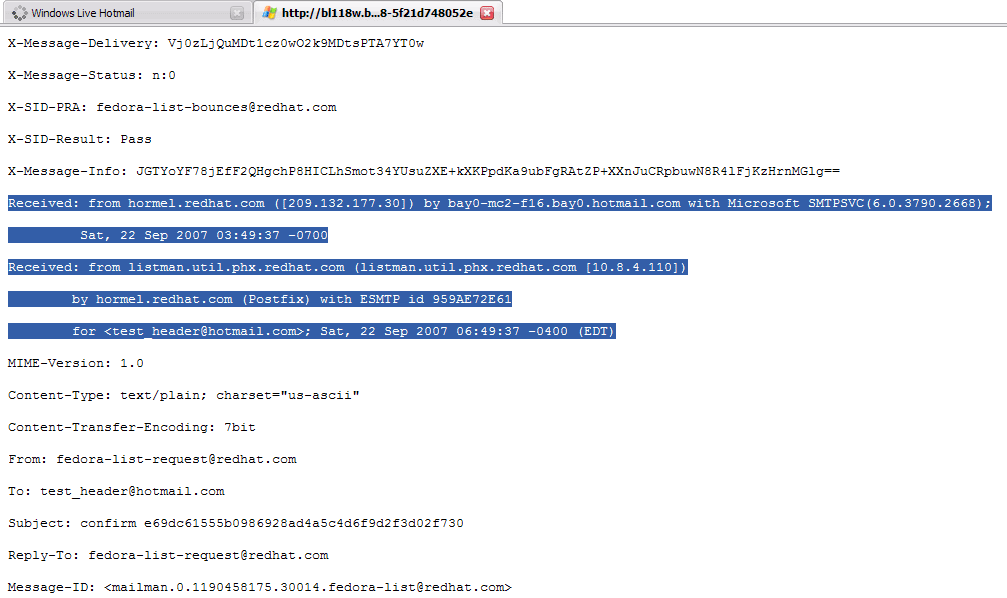
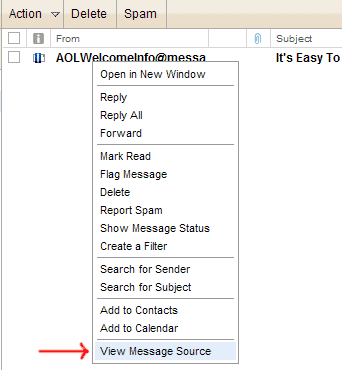
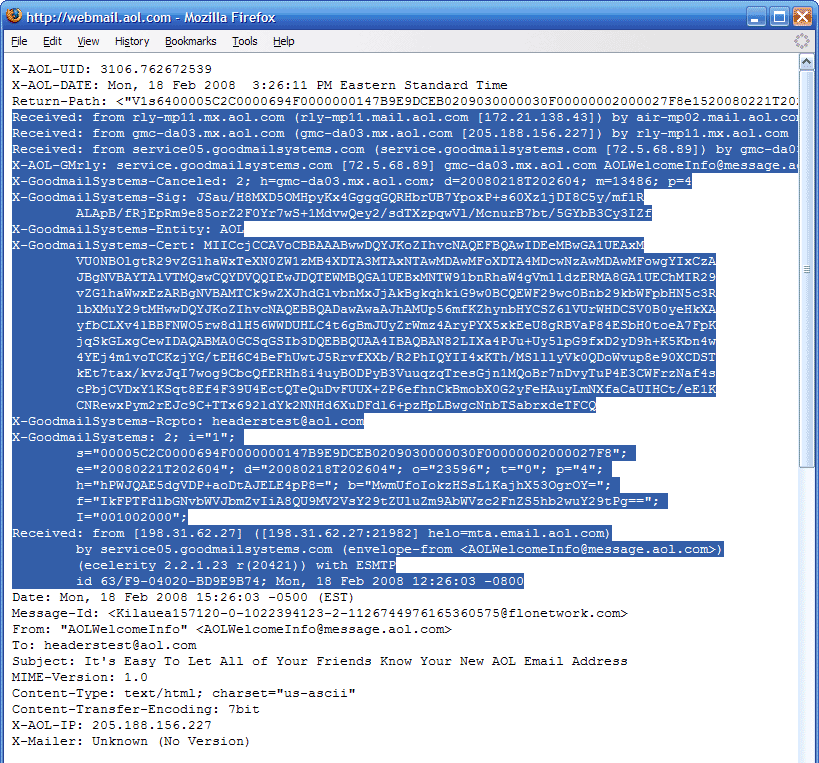
When you recieve an email, you receive more than just the message. The email comes with headers that carry important information that can tell where the email was sent from and possibly who sent it. For that, you would need to find the IP address of the sender. The tutorial below can help you find the IP address of the sender. Note that this will not work if the sender uses anonymous proxy servers.


First of all, the IP address is generally found in the headers enclosed beween square brackets, for instance, [129.130.1.1]

Finding IP address in Gmail

1. Log into your Gmail account with your username and password.
2. Open the mail.
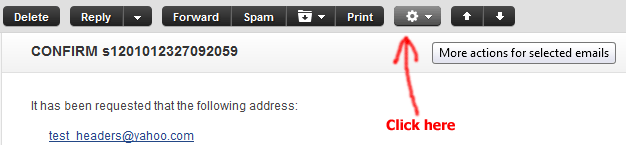
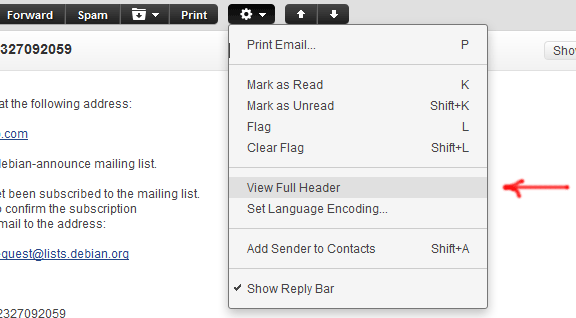
3. To display the email headers,

* Click on the inverted triangle beside Reply. Select Show Orginal.


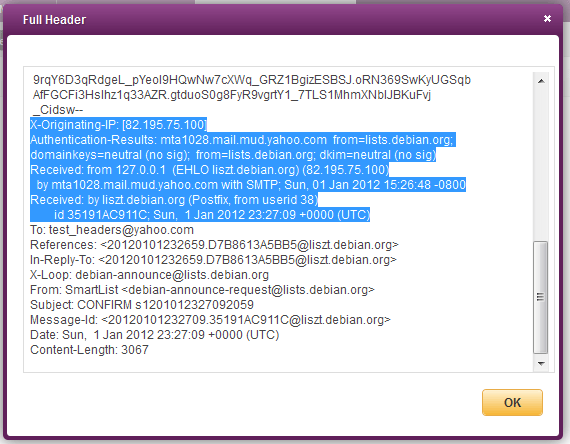
4. manually find the IP address,as below


5. Look for Received: from followed by the IP address between square brackets [ ].

Received: from [69.138.30.1] by web4587.mail.***.yahoo.com


6. If you find more than one Received: from patterns, select the last one.


7. Track the IP address of the sender


Yahoo Mail


Hotmail


AOL


LINK TO THIS POST :


Removing the Shortcut arrow from Desktop Icons


Goto Start then Run and Enter regedit. Navigate to


HKEY_CLASSES_ ROOT > lnkfile


Delete the IsShortcut registry value. You may need to restart Windows XP.


LINK TO THIS POST :


How to rename recycle bin?


1. Open Run box from Start menu or use shortcut " windows key + r "

2. Type " regedit " and press enter.

3. Then a window named " Registry Editor " opens.

4. Go to My computer\HKEY-CURRENT_USER\Software in the left hand side

5.

a) Now if you have installed " Google Desktop " follow the following instructions

- Go to Google\Google Desktop\Localized in the left hand side

- Go to " Recycle Bin " in the right hand side and right click on it and choose the option " Modify "

In the pop up window, change the value data to your desired name and that will be the new name of the Recycle Bin.

b) If you haven't installed Google Desktop, then follow the following steps

- Go to Microsoft\Windows\ShellNoRoam\MUICache in the left hand side after going to
My computer\HKEY-CURRENT_USER\Software

- go to the key " @c:\windows\system32\shell32.dll,-8964 " in the right side and has a name ' recycle bin ' right click on it and choose the option ' Modify '.

- In the pop up window, change the value data to your desired name and that will be the new name of the Recycle Bin.

6. Refresh the desktop and you will see the new name of the Recycle Bin.


LINK TO THIS POST :


Remove recycle bin on the desktop


1. Click on Start menu and then on "Run".

2. In the dialog box type: gpedit.msc

3. On the right pane under User Configuration expand "Administrative Templates"

4. In the expanded list click on the "Desktop" option

5. On the left pane find "Remove Recycle Bin icon from desktop" and double click on it

6. In the Properties window check "Enabled"

7. Apply >> OK

8. Refresh your Desktop and ... no more Recycle Bin

LINK TO THIS POST :


RECENT POSTS

If you like this blog,then link back to me.
This is what you will see.


Followers

Cyber Crunch : A Tech Blog © 2009 Template by TechnoTrends.

Feedbase

Please Register in TechnoTrends and post articles