Showing posts with label MOBILE. Show all posts

Send messages from mail to mobile via 160by2.com and way2sms.com

http://imgur.com/OaiU1.jpg
Yes..its true..
Now we can send messages to mobile using gmail without logging in to 160by2.com and way2sms.com
Just follow the steps as per in the image...

LINK TO THIS POST :


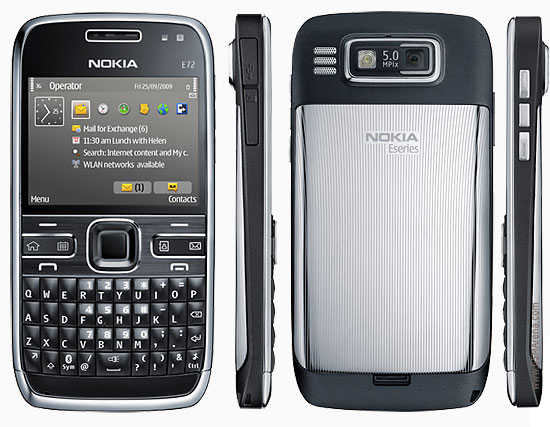
Nokia E-72


The leak of a promotional video containing two upcoming Nokia Eseries handsets, at the time labeled E72 and E75, has spawned some digging around a few of the common sources of Nokia info.

Features

* 320 x 240 pixel display
* S60 Feature Pack 1 (OS 9.2; not FP2 love for Eseries apparently)
* GPRS / EDGE / UMTS
* WiFi
* Three variants, presumably with varying flavors of 3G (same as the E71)
* Basically an E71 with a thick candy shell

Beyond that, it looks like the E72 / E63 will see a much-needed boost in terms of camera resolution, possibly even by way of some Carl Zeiss love. From the video it also looks like the size of the space key has been reduced by about 50% to allow the “/” and “@” keys on the left side of the board to be spread out (possibly with volume controls on each key). On the right side, it looks like the control and character keys have been separated as well. Honestly, we would have preferred to keep the wider space key


LINK TO THIS POST :


Apple iPhone 3G S gets FCC clearance like clockwork


We have a hard time believing that the FCC's documentation system is efficient and well-coordinated enough to actually reveal documents at the exact date and time that filers want them to -- so who knows, maybe the feds are in bed with Apple on keeping its most prized launches under lock and key until just the right moment.


We kid, we kid -- maybe -- but at any rate, you can now peruse hundreds of pages of specific absorption rate plots for GSM, UMTS / HSDPA, WiFi, and Bluetooth in both 16 and 32GB flavors of the iPhone 3G S. It's not likely going to tell you anything you didn't already know or care about, especially since there aren't any external photos or user's manuals accessible yet -- but if you get really, amazingly bored this evening, it might be worth a look-see.


LINK TO THIS POST :


Top 10 High-End Mobile Phones in the Market

Just to introduce..Reviews and latest prices will be updated later..

1.Apple iPhone 3G


2.Nokia E71


3.BlackBerry Bold


4.Nokia 5800 Xpressmusic


5.Motorola ZINE ZN5


6.Sony Ericsson XPERIA X1


7.HTC Touch HD


8.Nokia N97


9.HTC G1


10.BlackBerry Storm


LINK TO THIS POST :


Nokia N82


Nokia N82 is considered as one of the best N-series Cellular product yet. I changed like 5 mobile phones (L6i, N73me, K810, W810i, K750) until I laid my hands on this beauty.


FEATURES

·5 megapixel camera with Autofocus and Carl Zeiss lens
·Xenon flash with lens cover
·2.4” 16m color display (QVGA)
·128mb Ram
·WIFI
·GPS receiver with A-GPS function
·3.5mm Audio jack
·Nokia maps application
·3G, EDGE, GPRS support
·S60 3rd edition Operating System
·TV-out function
·Automatic Screen UI rotating sensor
·Stereo Speakers, FM
·1050 mAh battery


Before the N82 I owned a Nokia N73 ME.
It was a very successful product from nokia at the time I had purchased it, but it had its share of lots of shortcomings. I used to get frustrated by that mobile phone due its sheer negligence to improve as a product even after recent firmware updates. And soon the time came I let it go…..

Next thing I purchased was a Sony Ericsson K810i, a very good mobile phone. One can say it’s charismatic. But the small size of screen + the joystick made me look ahead of it too. (Mind you my palms sweat, hence I used to fear with the very gap left there in k810i with its small joystick).

Now I wanted to be dead sure that next mobile phone that I would purchase for myself should last me like 2.5-3yrs similar to my old lovely Sony Ericsson K750i. Looked for various reviews, advantages, shortcomings, price to performance etc… etc…. and finalized for a Nokia N82 (of course the Black Edition).

SE k850 and Nokia 95 8GB were also under my options but I dint like them enough.

LINK TO THIS POST :


HTC Touch Diamond 2


HTC Touch Diamond 2 specification

  • 5 Mega-pixel camera with Autofocus & Photo Album
  • Video Recorder with Vidoe Album
  • Vidoe Player with WMV, MPEG4, AVI, ASF & 3GP formats
  • Additional CMOS VGA Camera
  • 3G Video calling
  • 3.2 inch WVGA LCD Touch screen display with 65k colours & 800 x 480 pixels
  • Music player with MP3, AMP, WAV,WMA, MIDI, AAC, AAc+ & eAAC+ formats
  • Built-in FM Radio
  • Polyphonic & MP3 Ringtones
  • SMS, MMS & Instant Messaging
  • Email messaging with attachments
  • Motion Games & Downloadable Games
  • Personal organiser with Phonebook, Calendar, Calculator, Clock Alarm Clock & Call Log
  • Built-In Handsfree Speakerphone
  • Document Viewer & Qualcomm® Processor
  • Windows Mobile Professional® 6.1 Operating system
  • TouchFLO™ 3D Control
  • A GPS Navigation
  • Handwriting Recognition
  • 512 Megabytes of ROM & 288 Mbytes of RAM with MicroSD™ memory support
  • 3G HSDPA, Bluetooth®, WiFi & Mini USB Connectivity
  • EDGE & GPRS Technology
  • Quad band 1900 GSM, 1800 GSM GSM, 900, 850 GSM & HSDPA 2100 & 900 Networks
  • HTML Web browsers
  • GSM Talk Time 5.6 hrs
  • HSDPA Talk Time 5 hrs
  • GSM Standby Time 360 hrs
  • HSDPA Standby Time 500 hrs
  • Video Call Time 2.5 hrs
  • Size 13.7 x 53.1 x 107.9mm
  • Weight 117.5 grams


LINK TO THIS POST :


Badaboom Media Converter Professional v1.1.0.132


Elemental Technologies’ Badaboom™ Media Converter takes a fundamentally different approach to video format conversion from other solutions. Instead of performing format conversion on the CPU, it harnesses massively parallel GPUs from NVIDIA. By using the power of the GPU, the time required for video conversion is reduced. As an added bonus, you can still use the CPU for normal everyday tasks such as email and internet browsing. Anyone can now painlessly convert video between formats including AVCHD, leaving more time to enjoy the video and eliminating the frustration of video conversion delays. The Badaboom™ Media Converter provides a simple to use tool for standard definition media conversion.


• Input video formats – MPEG2, H.264, RAW*, HDV**, AVCHD**
• Input audio formats – AC-3, MP2, PCM
• Input file types – .m2v, .mpg, .vob, .avi*, .trp, .ts, .m2t, .m2ts, .mpeg, .mts
• Input resolutions supported – 1920x1080 and below
• Output video formats supported – H.264 (MP4) Baseline Profile
• Output audio formats – AAC-LC (2 channel)
• Output resolutions supported – 1280x720 and below
• Hardware compatibility – Badaboom is compatible with all CUDA enabled NVIDIA GPUs which are described on the NVIDIA site.
• Software compatibility – Badaboom currently supports Microsoft Windows only. Windows Vista 32, Windows Vista 64, Windows XP 32 and Windows XP 64 are supported.


LINK TO THIS POST :


MOBILE PHONE RADIATION EFFECTS


Don't bypass my words. These are not rumors/fake news,please try to take care of using mobile phones.

1) Do not keep the phone near your ears immediately after dialing the number.
2) Make sure to change the position of the phone from left ear to right ear for every 5 minutes.

3) If you have a earphones for your phone , make use of it.They are not meant not only for listening MP3, and FM , but also to make calls.
4) If you don't have ear phones make sure of using loud speaker.
5) If you want to make calls in public places like Bus stand,Cinema Halls, railway stations etc..and if you don't want to make use of loud speaker, better( sorry Best) make use of earphones.
6) Do not Buy cheap level phones, they have high radiation effects.
7) Don't use the phones in LIFTS, near mobile towers, Closed rooms, in Cars (doors closed).
8) Keep your mobile phones in your hands than to keep in Shirt Pockets or Belt pouches.
9) Keep the mobiles on your desk rather to keep them in pockets.
10) Don't attend the calls while your mobile is kept for charging(it has high radiation effects).


Finally talk less in mobile phones.
They are just meant for Communication Purpose.


If you want to make use of mobile phones as an MP3 player,FM player,or for playing games, Put your mobile phone profile in FLIGHT MODE. (or take off the Sim card)


LINK TO THIS POST :


RECENT POSTS

If you like this blog,then link back to me.
This is what you will see.


Followers

Cyber Crunch : A Tech Blog © 2009 Template by TechnoTrends.

Feedbase

Please Register in TechnoTrends and post articles