Showing posts with label REGISTRY. Show all posts

Enable/Disable Hard Disk Free Space Warning Balloon Tip


By default, Windows posts an alert when the amount of free space remaining on your hard disk falls below 10 percent.

To alter this behavior, edit:

HKEY_LOCAL_MACHINE\System\CurrentControlSet\Services \LanmanServer\Parameters

Add Value DiskSpaceThreshold with a type of REG_DWORD and set it to the percentage of free disk space remaining before an alert is sent. The allowable range is 0 - 99 percent.

Key: [HKEY_LOCAL_MACHINE\System\CurrentControlSet\Services\LanmanServer\Parameters]
Value Name: DiskSpaceThreshold
Data Type: REG_DWORD
Data: 0 - 99

LINK TO THIS POST :


Are your icons too small? Or too big?


Are your icons too small? Or too big? This setting will let you resize them to suit your desktop preference.

Open the registry and find the key below.

Create a new value named 'Shell Icon Size' and set the value, or modify the existing value, to equal the size of your icons in pixels. Smaller values = smaller icons!


Key: [HKEY_CURRENT_USER\Control Panel\Desktop\WindowMetrics]
Value Name: Shell Icon Size
Data Type: REG_SZ
Data: Size in Pixels (Default = 32)

LINK TO THIS POST :


Change The Default Location For Installing Apps

export registry


As the size of hardrives increase, more people are using partitions to seperate and store groups of files.

XP uses the C:\Program Files directory as the default base directory into which new programs are installed. However, you can change the default installation drive and/ or directory by using a Registry hack.

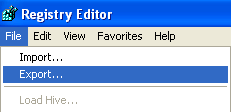
Firstly, you’re going to want to make a backup of your registry before making any changes. You can back it up by opening the registry editor and choosing File and then Export.

export registry


Run the Registry Editor (regedit)and go to

HKEY_LOCAL_MACHINE\SOFTWARE\Microsoft\Windows\CurrentVersion


By default,this value will be C:\Program Files. Edit the value to any valid drive or folder and XP will use that new location as the default installation directory for new programs.

Now look for a key in the right panel called ProgramFilesDir. You should see that the value is C:\Program Files.

programfilesdir


Now you can change the path where ever you like to install the programs by default.


LINK TO THIS POST :


Removing the Shortcut arrow from Desktop Icons


Goto Start then Run and Enter regedit. Navigate to


HKEY_CLASSES_ ROOT > lnkfile


Delete the IsShortcut registry value. You may need to restart Windows XP.


LINK TO THIS POST :


Restarting Windows without Restarting the Computer


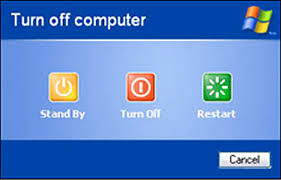
This one is again is. When you cl!ck on the SHUTDOWN button, make sure to simultaneous press SHIFT Button. If you hold the Shift key down while *** on SHUTDOWN button, you computer would restart without restarting the Computer. This is equivalent to term "HOT REBOOT".

Stopping XP from displaying unread messages count on Welcome Screen:
To stop XP from displaying count of unread messages, Open registry and navigate to

[HKEY_CURRENT_ USER\Software\ Microsoft\Windows\CurrentVersion\UnreadMail]

and look for the data key "MessageExpiryDays" . If you do not see this key, create one DWORD key by the name "MessageExpiryDays" . Setting its value to 0 would stop Windows XP from displaying the count of unread messages.


LINK TO THIS POST :


RECENT POSTS

If you like this blog,then link back to me.
This is what you will see.


Followers

Cyber Crunch : A Tech Blog © 2009 Template by TechnoTrends.

Feedbase

Please Register in TechnoTrends and post articles